Client paid twice or too much: refunding, your records and whether you need a credit note
16 November 2026 · 5 min read · checked and edited by Jarno van den Hove
If your client paid an invoice twice, or transferred more than the invoice said, that money is not yours. You refund it, or offset it against a next invoice if your client agrees. You do not need a credit note for that: your invoice is right, only the payment is not. Only if your invoice itself was too high do you correct it with a credit note. (General information, not tax or legal advice.)
Why you have to pay it back
A payment without a legal ground is, in Dutch law, an undue payment (onverschuldigde betaling). Whoever makes such a payment may claim it back (Article 6:203 of the Dutch Civil Code). So your client is entitled to the amount paid too much, even if they have not noticed yet. Tell them yourself. It saves their accountant trouble and is good for the relationship.
First: which situation is it?
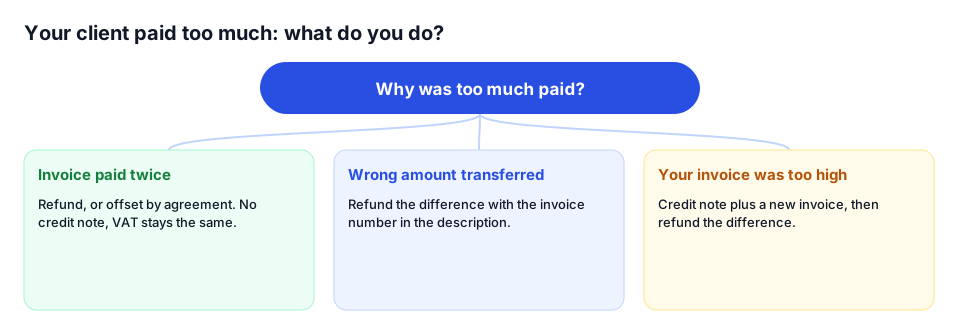
- Paid twice: the same invoice transferred twice, for example once by hand and once through the payment link. Your invoice is right.
- Wrong amount transferred: your client typed €1,512.50 instead of €1,512.05. Your invoice is right.
- Your invoice was too high: too many hours, a wrong rate or the wrong VAT. Then the payment is not the problem, the invoice is.
Refund or offset?
- Refund: transfer the amount back to the account it came from, with the invoice number and “refund of double payment” in the description. This is the clearest route.
- Offset: only if your client wants it and you expect a next invoice. Confirm the agreement by email.
- When you offset, the new invoice stays complete: same amount, same VAT. You show the amount paid too much below it as a payment already received, referring to the first invoice.
Worked example: an invoice of €1,815 paid twice
Your invoice 2026-0112 is €1,500 + €315 VAT = €1,815. Your client pays on 4 November through the iDEAL link and their accountant transfers another €1,815 on 6 November. On 7 November you refund €1,815 with the description “Refund of double payment invoice 2026-0112”. Your turnover stays €1,500 and your VAT €315. If your client chooses to offset, your next invoice 2026-0118 of €800 + €168 VAT = €968 says: “Already received (double payment invoice 2026-0112): −€968, still to pay: €0”. You refund the remaining €847 or offset it later, as agreed.
What you do in your records
- Your VAT follows the invoice, not the payment. On the invoice basis, VAT is due when you issue the invoice (Article 13 of the Dutch VAT Act). A double payment does not change your invoice, so your turnover and VAT stay the same.
- Do not book the second payment as turnover, but as an amount you owe your client, until you have refunded or offset it.
- Keep the bank statement with the double payment together with the one showing the refund, so your accountant sees that they cancel out.
When do you need a credit note?
If your invoice itself was too high, your records are no longer right, and neither is your VAT. Say you invoiced 12 hours instead of 10 hours at €75, so €900 + €189 VAT = €1,089, and your client paid that. Then you issue a credit note of −€900 and −€189 VAT and a new invoice of €750 + €157.50 VAT = €907.50. You refund the difference of €181.50. Without a credit note you still owe the €189 VAT that is on the invoice. How numbering works with credit notes is explained in invoice numbering rules.
Preventing double payments
- Show your invoice number prominently and ask your client to put it in the payment description
- Use one payment route per invoice: a payment link or a bank transfer, not both mixed up
- Mark an invoice as paid as soon as the money is in, so no reminder goes out
- Thank your client for the payment; then their accountant also knows the invoice is settled
Overpayments and Factando
A paid invoice in Factando no longer has a working iDEAL button: the payment link only works for an open or overdue invoice. If you match payments from your bank statement, Factando only matches them to open invoices; a second payment on an invoice that is already paid is therefore not matched and stands out as a loose item. You make the refund yourself from your bank: Factando cannot transfer money. If you offset against a next invoice, put the offset in the notes of that invoice. A credit note in Factando always covers the whole invoice; after that you make the new, correct invoice.
Sources
The rules in this article come from these official pages. Check the current amounts and deadlines there.
Frequently asked questions
Do I have to refund a double payment?
Yes. Your client paid without a legal ground and may claim the amount back. Refund it, or offset it against a next invoice if your client wants that.
Do I need a credit note if my client paid too much?
Not if your invoice was right and only the payment was too high. If the invoice itself was too high, you do issue a credit note and a new invoice.
Does a double payment change my VAT return?
No. Your VAT follows the invoice, not the payment. Turnover and VAT stay the same; the second payment is an amount you have to give back.
Can I keep the overpayment for a next job?
Only if your client agrees. Record that agreement and show the offset on the next invoice, which itself stays complete.
Done with invoicing by hand?
Factando makes a correct Dutch invoice for you: numbering, VAT and layout are handled automatically. Try it free without an account; saving and sending takes a free account (3 sent invoices a month). Pro, with automatic payment reminders, is free for 14 days.