Invoicing in dollars or pounds from the Netherlands: exchange rate and VAT
11 November 2026 · 5 min read · checked and edited by Jarno van den Hove
A Dutch invoice may be in any currency: US dollars, pounds, Swiss francs. One rule is strict: if the invoice carries Dutch VAT, the VAT amount must (also) be stated in euro. Without VAT, for example with reverse charge or a business client outside the EU, the whole invoice may be in the foreign currency. Your own records and returns are always in euro. (General information, not tax advice.)
What the law says
Article 35a(4) of the Dutch VAT Act: amounts on an invoice may be expressed in any currency, provided the VAT payable is stated in euro. All other invoice requirements still apply.
Which exchange rate?
To convert the VAT you choose one of two rates, at the moment the VAT becomes due (for services usually the invoice date):
- The latest selling rate, for example from your bank
- The latest rate published by the European Central Bank (ecb.europa.eu)
Worked example: USD 2,000 with 21% VAT
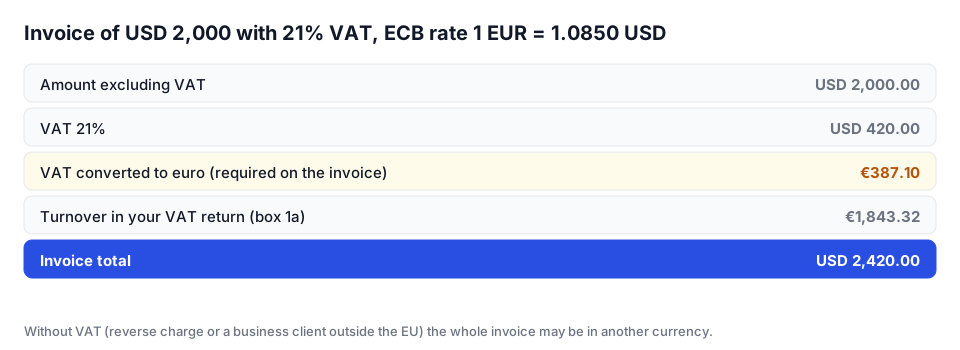
A Dutch company wants to pay in dollars for a USD 2,000 project excluding VAT. Invoice date 10 November 2026, ECB rate that day (say) 1 euro = 1.0850 dollar.
- Amount excluding VAT: USD 2,000.00
- VAT 21%: USD 420.00, converted 420 ÷ 1.0850 = €387.10
- Total: USD 2,420.00
- On the invoice: “VAT 21%: USD 420.00 (€387.10, ECB rate 10-11-2026: 1 EUR = 1.0850 USD)”
- In your VAT return: turnover 2,000 ÷ 1.0850 = €1,843.32 and VAT €387.10 in box 1a
Without VAT: the whole invoice in dollars
If you reverse-charge VAT to a business in another EU country, or invoice a service to a business outside the EU, there is no VAT amount on the invoice, so everything may be in the foreign currency, for example GBP 3,000 to a client in London. For your records and VAT return (box 3b for reverse charge) you still convert to euro; note the rate you used.
Exchange differences on payment
If your client pays three weeks later, the rate has usually moved. Say the USD 2,420 brings in €2,215 instead of the €2,230.42 you booked. That €15.42 is an exchange loss, not a VAT correction: your VAT return stays based on the rate at the moment the VAT became due. Your bank's conversion fees are ordinary business costs.
Foreign currencies in Factando
Choose the currency per client or per invoice, for example USD or GBP; every amount on the invoice is then in that currency. When you choose another currency, Factando fetches the ECB rate of your invoice date (or the last publication before it); you can also enter your own rate. With VAT on the invoice, Factando prints a “VAT in EUR” line with the rate and date on the invoice and in the e-invoice, and you cannot save such an invoice without a rate. Your VAT and year overviews count these invoices in euro at the invoice's rate. With reverse charge and business clients outside the EU the rate is optional. The iDEAL button only appears on invoices in euro.
Sources
The rules in this article come from these official pages. Check the current amounts and deadlines there.
Frequently asked questions
Can I invoice in US dollars as a Dutch freelancer?
Yes. If the invoice carries Dutch VAT, the VAT amount must also be shown in euro. Without VAT the whole invoice may be in dollars.
Which exchange rate should I use?
The latest selling rate or the latest ECB rate at the moment the VAT becomes due, for services usually the invoice date. Use the same source every time and note the rate.
What do I do with an exchange difference?
The difference between what you booked and what you receive is an exchange gain or loss in your accounts. You do not adjust your VAT return for it.
In which currency do I file my VAT return?
Always in euro. Convert turnover and VAT at the rate you used for the invoice.
Done with invoicing by hand?
Factando makes a correct Dutch invoice for you: numbering, VAT and layout are handled automatically. Try it free without an account; saving and sending takes a free account (3 sent invoices a month). Pro, with automatic payment reminders, is free for 14 days.