Reverse-charge VAT invoices for EU clients: what to write and what to check
9 November 2026 · 6 min read · checked and edited by Jarno van den Hove
When you provide a service from the Netherlands to a business in another EU country, you usually do not charge Dutch VAT. Instead the VAT is reverse-charged: your client reports and pays the VAT in their own country, at their own rate. In Dutch this is 'btw verlegd'. The invoice looks different from a domestic one, and you have to check a few things before you send it. This article covers the rule, the wording, the VIES check, the reporting, the exceptions, and what changes for clients outside the EU. (General information, not tax advice.)
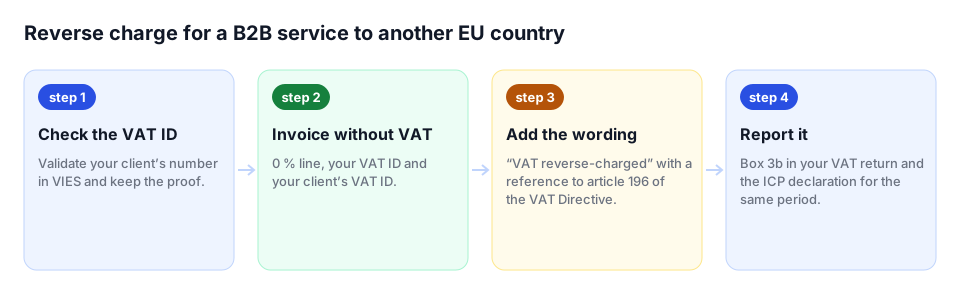
When does the reverse charge apply?
Business.gov.nl summarises the main rule for services inside the EU: for most services to business clients in another EU country, you reverse-charge the VAT. The EU's Your Europe portal puts it the same way: if you sell services to businesses based in another EU country you don't usually need to charge your customers VAT; the customer accounts for the VAT in their own country under the reverse charge procedure. You can still deduct the VAT on costs linked to those sales.
The condition is that your client is a business. Services to private individuals in other EU countries are normally subject to Dutch VAT, or, if you have to pay VAT in the client's country, you can report it quarterly through the one-stop shop (OSS).
Step 1: confirm your client is a business, and check the VAT number in VIES
A business has a VAT identification number. Ask for it, and verify it in VIES, the European Commission's VAT number validation tool, before you invoice. Business.gov.nl is explicit about the risk: if the customer turns out not to be an entrepreneur, you may have to pay the VAT yourself and receive an additional assessment. Keep a record of the check (a screenshot or the consultation details with the date) in your administration, together with the invoice, so you can show later that the number was valid when you invoiced.
Step 2: put the right details on the invoice
A reverse-charge invoice contains everything a normal Dutch invoice contains (see how to invoice as a freelancer in the Netherlands), plus:
- Your own VAT identification number: the Belastingdienst states this must also be included in cases of reverse-charging
- Your client's VAT identification number: for supplies to other EU countries this is a mandatory invoice item
- The statement 'VAT reverse-charged' (btw verlegd), so the invoice makes clear that a special VAT arrangement applies
- No VAT rate and no VAT amount; the total equals the net amount
Many freelancers add the legal basis to the statement, for example 'VAT reverse-charged to the recipient (Article 196, EU VAT Directive 2006/112/EC)'. The law only requires that the reverse charge is apparent from the invoice; the article reference helps your client's accountant book it correctly. Write the invoice in English or in your client's language if you like; the required content is the same.
Step 3: report it in your VAT return and the ICP declaration
Reverse-charged services are not invisible to the Belastingdienst. Business.gov.nl explains that you report them in your VAT return and in a separate Intra-Community transactions declaration (opgaaf ICP). The declaration covers services you provide to an entrepreneur in another EU country that are taxed in that entrepreneur's country. You list the client's VAT number and the total amount per client per period. The totals in the ICP declaration have to match the amounts in your VAT return, so keep the invoices per EU client together.
When can you not reverse-charge?
Reverse charging is not always possible. Business.gov.nl names examples where other rules apply: restaurant and catering services, services relating to immovable property, and the transport of persons. For these the VAT is due where the service is physically performed or where the property is located, which may mean registering for VAT in that country. If your work falls into one of these categories, check the rules for that specific service before you decide on the invoice.
What about clients outside the EU?
For a business client outside the EU, for example in the United Kingdom, the United States or Switzerland, there is no EU reverse charge and no VIES check, because the client has no EU VAT number. The Your Europe portal states that if you provide services to customers outside the EU, you usually do not charge VAT; however, if the service is used in another EU country, that country can decide to charge the VAT. You still deduct the VAT on your related costs.
On the invoice you show no VAT and a statement such as 'VAT not applicable: service supplied to a client outside the EU'. The Belastingdienst's English page on reverse charging links to Dutch-language guidance for services to and from non-EU countries; the rules for specific services (digital services, for instance) can differ, so check your case.
A worked example
You are a freelance UX designer in Amsterdam and you did a two-week project for a software company in Berlin for €4,800. You ask for their VAT number, DE123456789, and check it in VIES on 5 November 2026; it is valid. Your invoice 2026-018, dated 6 November 2026, shows your name, address, KVK number and NL VAT id; the client's name, address and DE VAT id; 'UX design, sprint 1 to 2, October 2026'; €4,800.00; and the line 'VAT reverse-charged to the recipient (Article 196, EU VAT Directive 2006/112/EC)'. There is no VAT line; the total is €4,800.00.
In your next VAT return you report the €4,800 as a supply to another EU country, and in the ICP declaration you list DE123456789 with €4,800.
Common mistakes
- Applying the reverse charge to a private individual because they are abroad; without a valid VAT number you charge Dutch VAT
- Forgetting the client's VAT number on the invoice
- Writing '0% VAT' instead of 'VAT reverse-charged'; 0% is a rate, the reverse charge is a shift of who pays
- Not filing the ICP declaration because 'there was no VAT'
- Checking the VAT number once and never again for a long-running client; numbers get deregistered
In Factando's free invoice generator you choose 'Reverse charge' as the VAT mode: the generator asks for the client's VAT id, checks it in VIES, and prints the reverse-charge statement with the directive reference on the PDF. Pro keeps the invoices per client together and exports them for your accountant; see pricing.
Sources
The rules in this article come from these official pages. Check the current amounts and deadlines there.
Frequently asked questions
What does 'VAT reverse-charged' mean on an invoice?
It means you charge no Dutch VAT and your business client reports and pays the VAT in their own EU country, at their own rate. The invoice shows both VAT identification numbers and the statement 'VAT reverse-charged'.
Do I have to check my client's VAT number?
Yes. Verify it in VIES, the European Commission's validation tool, before you invoice. If the client turns out not to be an entrepreneur, you may have to pay the VAT yourself.
Do I still report reverse-charged services to the Belastingdienst?
Yes. You report them in your VAT return and in the Intra-Community transactions declaration (ICP), listing the client's VAT number and the amount per period.
What about a client in the UK or the US?
For business clients outside the EU you usually charge no VAT, but there is no EU reverse charge and no VIES check. State on the invoice that the service was supplied to a client outside the EU.
Done with invoicing by hand?
Factando makes a correct Dutch invoice for you: numbering, VAT and layout are handled automatically. Try it free without an account; saving and sending takes a free account (3 sent invoices a month). Pro, with automatic payment reminders, is free for 14 days.