Dutch VAT ID or tax number: which one goes on your invoice?
11 November 2026 · 4 min read · checked and edited by Jarno van den Hove
Once you are registered for VAT in the Netherlands, the Belastingdienst sends you two numbers. The VAT identification number (btw-id) is the one you put on invoices and share with clients and suppliers. The VAT tax number (omzetbelastingnummer) is only for contact with the tax office, such as your VAT return. So your invoice shows the VAT ID, never the tax number. (General information, not tax advice.)
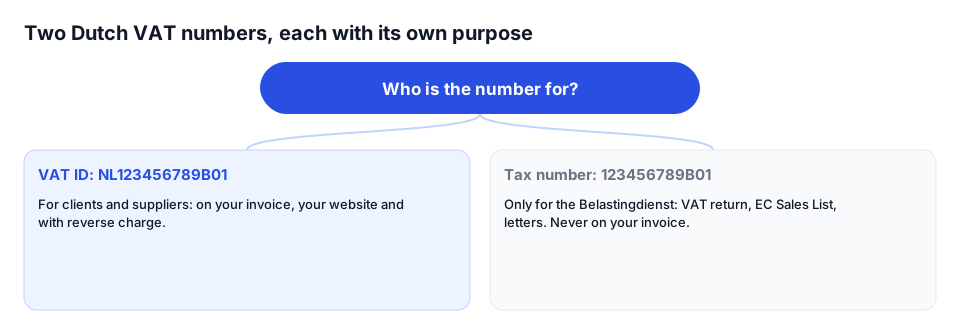
What the two numbers look like
- VAT ID (btw-id): NL, 9 digits, the letter B and 2 digits, for example NL123456789B01. 14 characters.
- Tax number (omzetbelastingnummer): 9 digits, B and 2 digits, for example 123456789B01. For a sole proprietorship the 9 digits are derived from your citizen service number (BSN).
- For a sole proprietorship the digits of the two numbers differ.
Why are there two numbers?
Sole proprietors used to have one VAT number that contained their BSN, printed on every invoice. Since 1 January 2020 they have a separate VAT ID for the outside world, without the BSN. The tax number stayed for contact with the Belastingdienst. For a BV the two are often almost identical, but the VAT ID is still the one for invoices.
Which number where?
- On your invoice: VAT ID (required if you charge VAT)
- On your website: VAT ID, required if you sell products or services through it
- Reverse charge: your client's VAT ID on the invoice, next to your own
- VAT return, EC Sales List (ICP) and letters to the Belastingdienst: tax number
Where to find your numbers
Both arrive by letter after you register with the KVK, within 10 working days. Lost them? Log in to Mijn Belastingdienst Zakelijk; both numbers are listed under Omzetbelasting (VAT).
Checking a client's VAT ID
Before you reverse-charge VAT to a business in another EU country, check their VAT ID in VIES, the European Commission's database. If the number is invalid you may not reverse-charge and must charge Dutch VAT. Dutch VAT IDs can be checked in VIES as well.
On the invoice
Next to your business details: “KVK 82345678 · VAT ID NL123456789B01”. With reverse charge to a Belgian client you add “VAT no. BE0123456789” to the client's details and the reverse-charge wording. Your tax number never appears on the invoice.
In Factando
Enter your VAT ID once under Settings → Business details; Factando checks the format and prints it on every invoice. With reverse charge, Factando validates your client's VAT ID in VIES straight away. Factando does not ask for your tax number, because you only need it with the Belastingdienst.
Sources
The rules in this article come from these official pages. Check the current amounts and deadlines there.
Frequently asked questions
Which VAT number goes on my Dutch invoice?
Your VAT identification number (btw-id), starting with NL, for example NL123456789B01. The tax number (omzetbelastingnummer) is only for contact with the Belastingdienst.
Is the VAT ID the same as the KVK number?
No. The KVK number has 8 digits and comes from the Chamber of Commerce. The VAT ID comes from the Belastingdienst. Both go on your invoice.
Where do I find my VAT ID?
In the letter from the Belastingdienst after your KVK registration, or in Mijn Belastingdienst Zakelijk under Omzetbelasting.
Does my VAT ID have to be on my website?
Yes, if you sell products or offer services through your website. Otherwise it is not required.
Done with invoicing by hand?
Factando makes a correct Dutch invoice for you: numbering, VAT and layout are handled automatically. Try it free without an account; saving and sending takes a free account (3 sent invoices a month). Pro, with automatic payment reminders, is free for 14 days.